Free Document OCR
Add your image
Extract text from a scan, table or slide screenshot in your browser. Select a line to check its position on the original page.
Extract text from scanned documents for free.
Use document OCR to copy an action item from scanned minutes, a quantity from an Excel screenshot or a chart label from a PowerPoint slide. Check the recognized line against its position on the page.
- Free OCR and exports
- Runs in your browser
- No sign-in required
Maya
Update the floor plan.
24 June
How to read a document with OCR
Capture one page
Drop a scan onto the canvas, paste a screenshot or open a direct image URL. Include the headings you need to interpret the text.
Find it in the original
Hover over a recognized line, or tap it on your phone. Its outline shows which paragraph, cell or chart label the words came from.
Take the text into your work
Copy a line into your notes or download the page as TXT, Markdown or JSON. Save the result before opening the next page.
Word, Excel and PowerPoint examples
Each screenshot comes from an editable sample file. Open one to compare its text with the browser’s OCR result, download the original file or run the screenshot yourself.
Prepare a scan or screenshot for document OCR
OCR accepts JPG, PNG and WebP images up to 10 MB and 24 megapixels. For an Office file or PDF, capture the part you want to read.
Word or PDF page
Open one page at a readable zoom. Capture the heading and paragraph together. For a paper document, photograph the page straight on in even light.
Excel or Sheets range
Zoom in until the digits are clear. Include column headings, units and row labels in the screenshot so each value has context.
PowerPoint or Slides deck
Export the current slide as a PNG or capture it in presentation view. For small footnotes, take a second close-up.
Find an action in Word meeting minutes
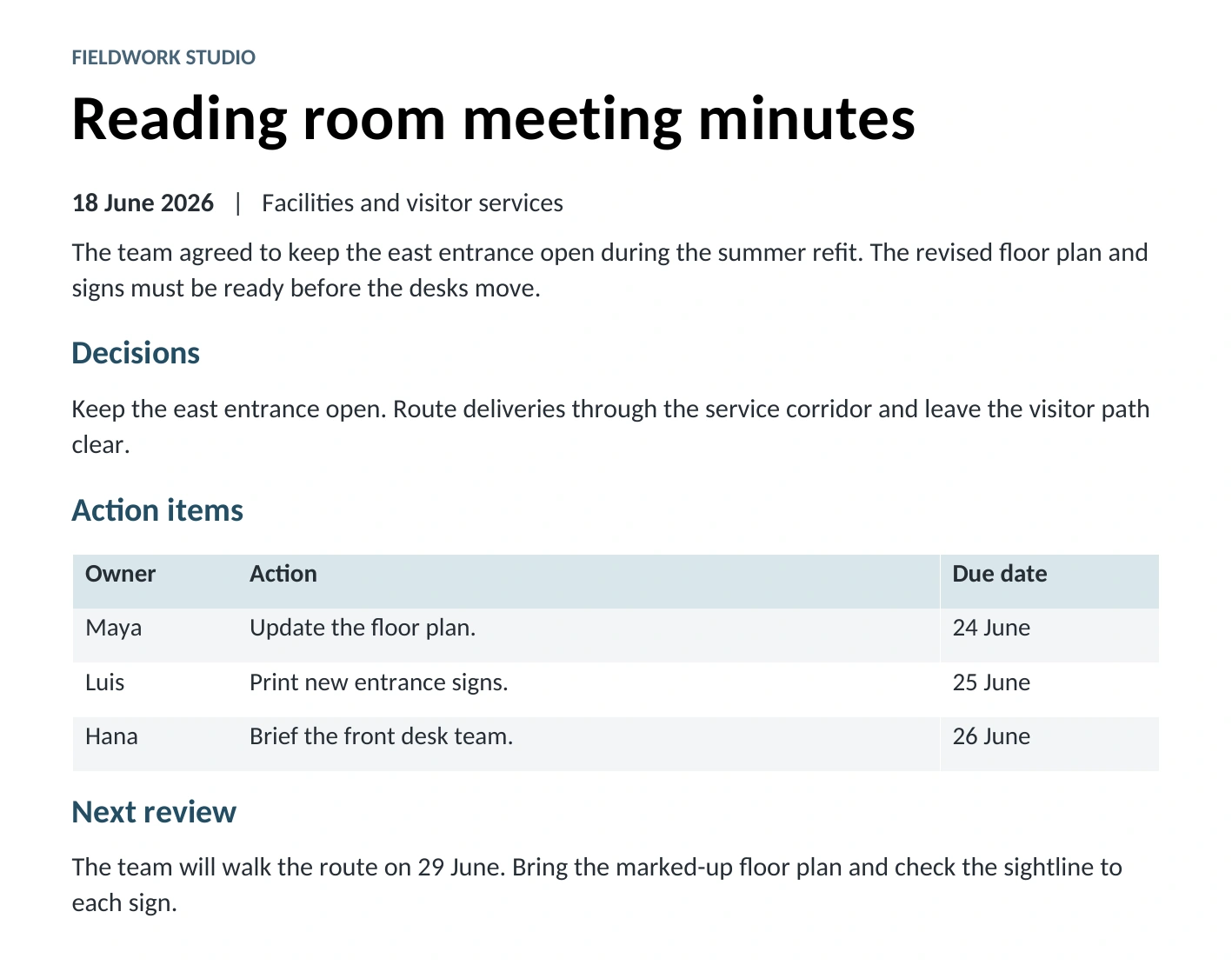
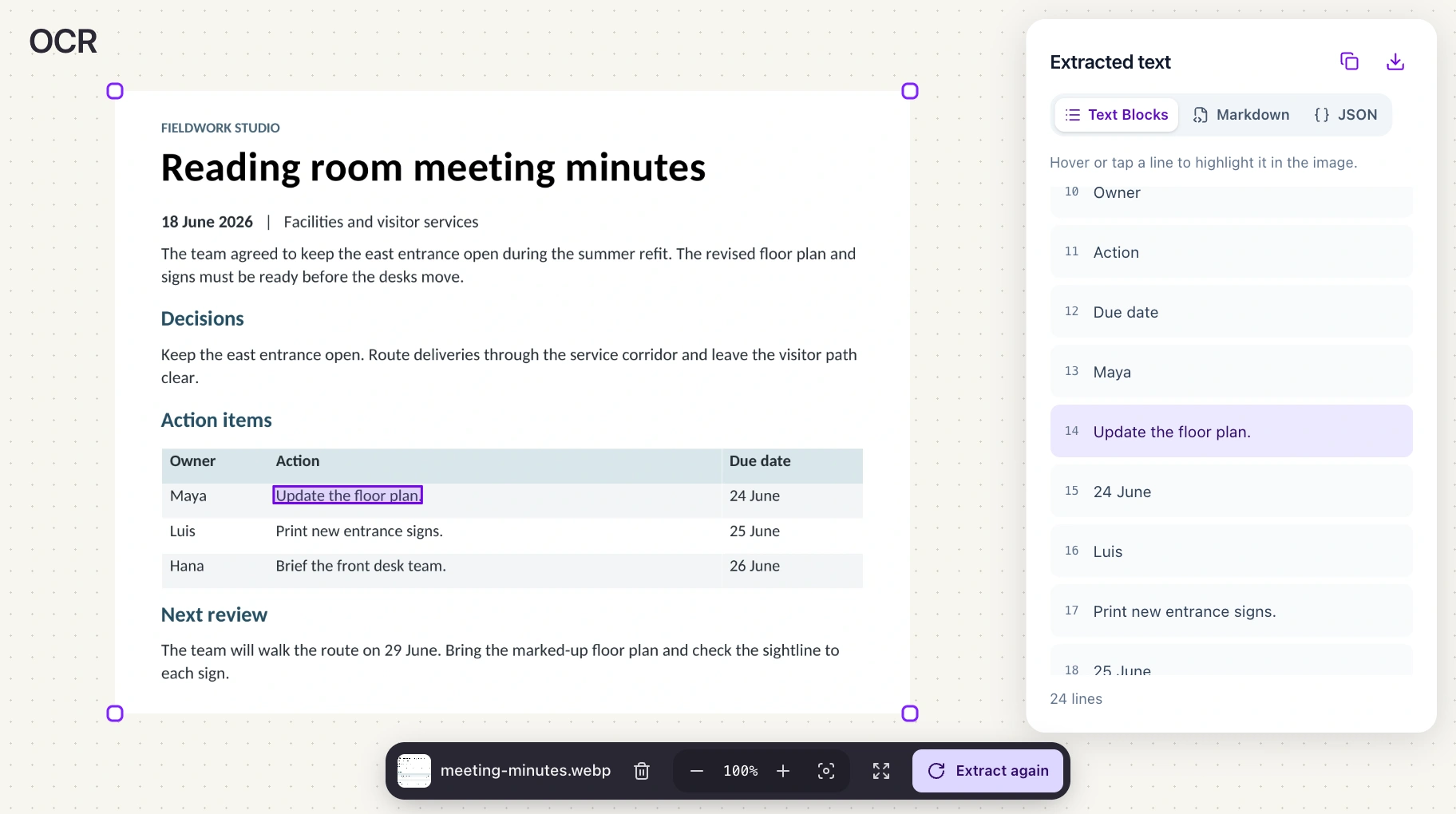
The highlighted line reads “Update the floor plan.” Look across the same row in the Word document to find Maya in the owner column and 24 June in the due-date column.
Check an Excel value against its cell
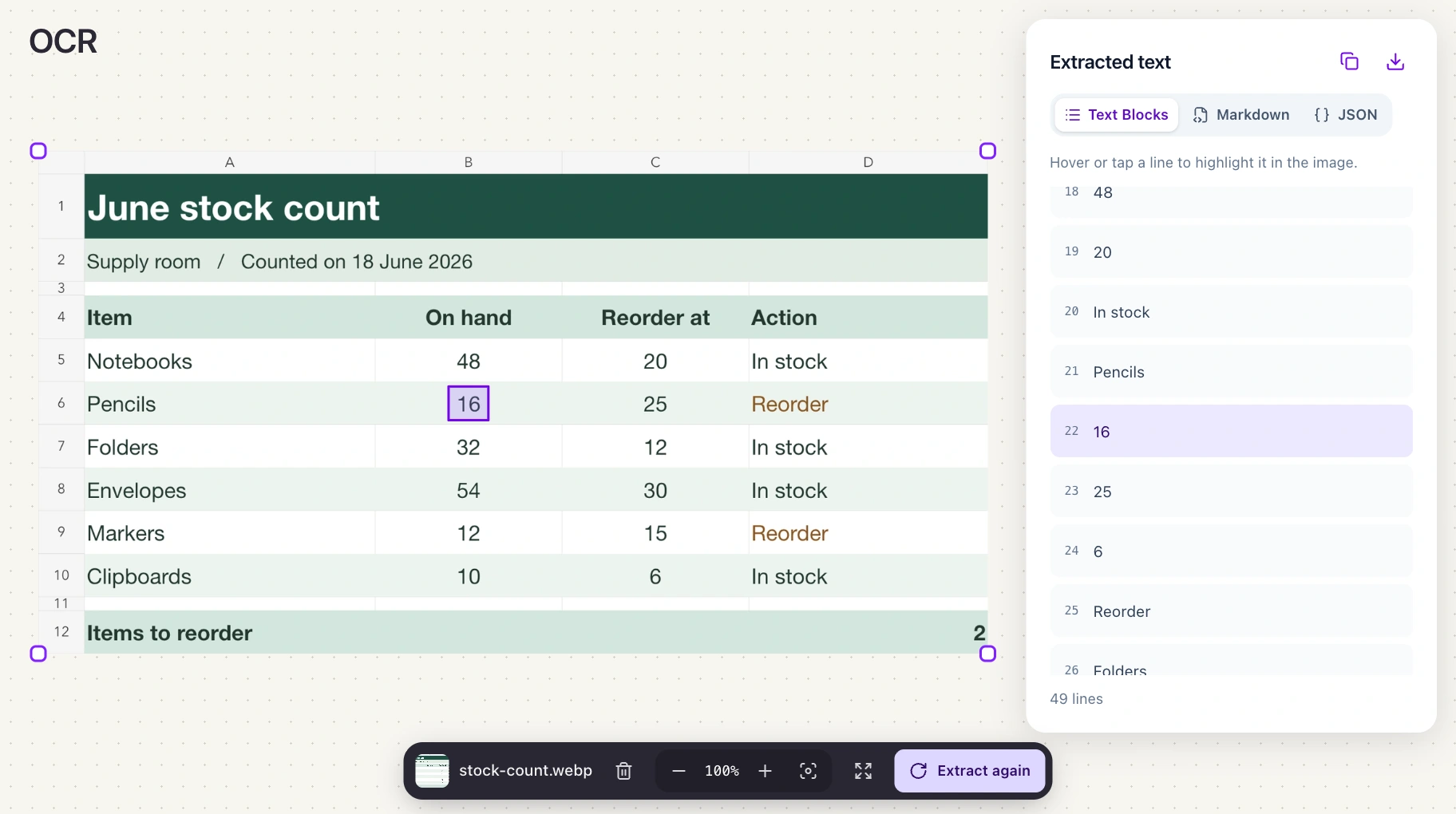
Selecting 16 highlights B6, the number of pencils on hand. The next cell holds the reorder threshold of 25. Open the workbook to inspect the formula that flags this row for reorder.
Match a PowerPoint value to its bar
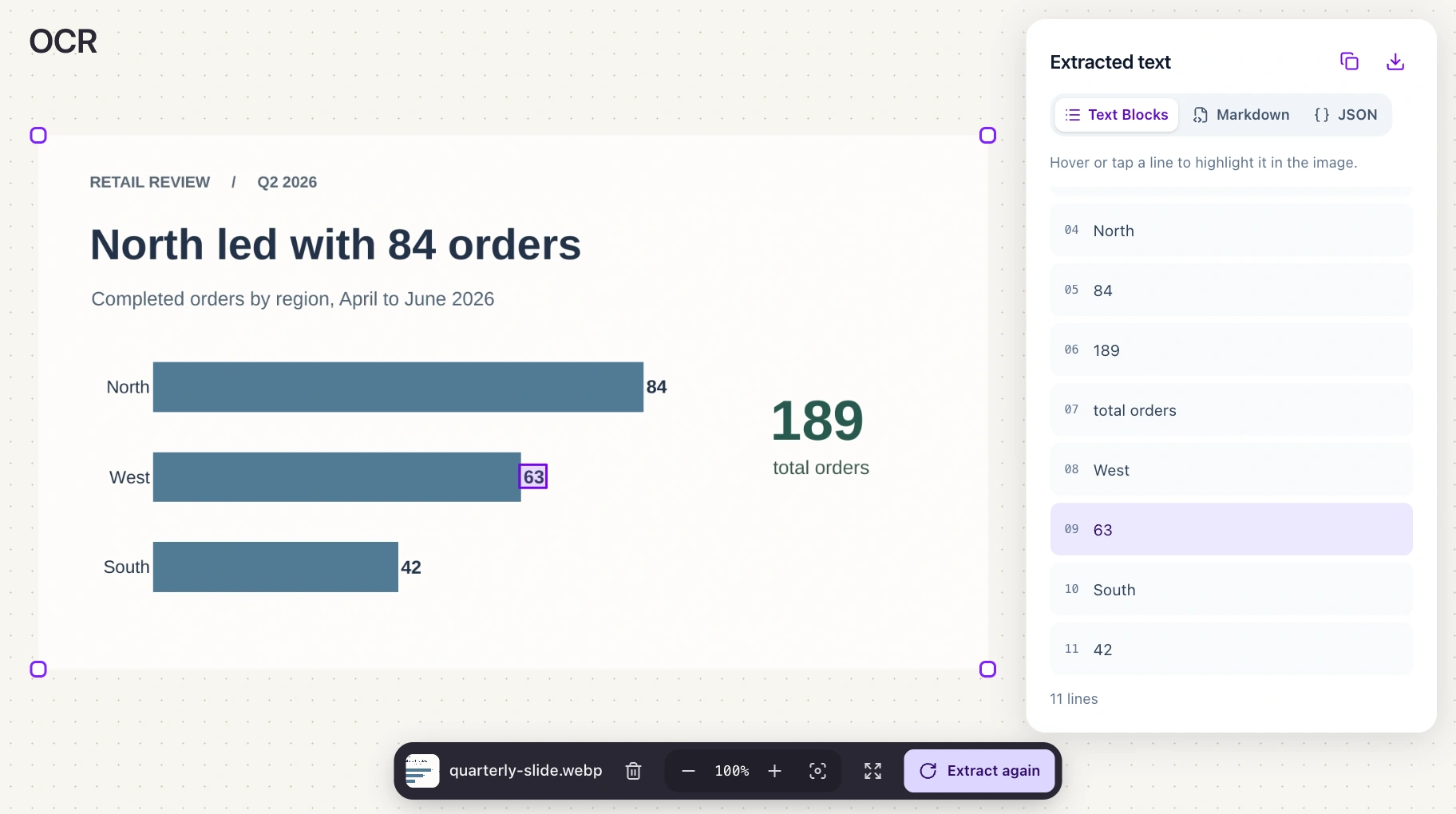
The slide contains three regional values and a total of 189 orders. Selecting 63 outlines the number at the end of the West bar. The slide subtitle supplies the reporting period, April to June 2026.
Export document OCR results as text, Markdown or JSON
- TXTQuote a passage
- Copy a single line or download all recognized lines from Text Blocks. Paste the passage into your report and add the source page number.
- MarkdownBuild meeting notes
- Keep the detected line breaks when moving an agenda into a Markdown editor. Add headings or group action items after checking the original.
- JSONKeep text positions
- Save each line with its outline and the OCR image dimensions. Use the coordinates to link a value back to its place on the page.
Frequently asked questions
Document scans
6 questionsWhich files can I open?
Upload a JPG, PNG or WebP image up to 10 MB and 24 megapixels. For a PDF or Word document, open the page you need, enlarge the text and take a screenshot.
How can I separate two columns of text?
Crop the left column and read it first, then repeat for the right column. Include the heading in each crop when it helps identify the passage.
Tables
6 questionsCan I use a screenshot from Excel or Google Sheets?
Yes. Select a view that includes the column headings and row labels, capture it as an image, and paste it into the OCR workspace.
What if my table is too wide to read?
Capture a few columns at a time. Include the row labels in each capture and keep units, such as dollars or kilograms, with the headings.
Slides
6 questionsHow do I prepare a PowerPoint slide?
Export the current slide as a PNG, or take a screenshot in presentation view. Capture the slide at full size so the chart labels and footnotes stay readable.
Why are the title and chart labels mixed together?
A slide can place several text areas at the same height. Use the highlighted regions to group the title, captions and chart labels when assembling your notes.
Privacy & results
6 questionsIs document OCR free to use without an account?
Yes. You can open a page image, recognize its text and export the result as a guest.
Can I reopen a result after leaving the page?
Document OCR keeps results in your current browser session. Copy the lines you need or download the result before closing or refreshing the page.
Read your next document
Open a page image and copy the lines you need. No sign-in required.
Open OCRCan document OCR turn a table screenshot into a spreadsheet?
Document OCR extracts text lines and their positions from a page image. It does not reconstruct formulas or cell formatting. Compare each value with its row and column before pasting it into a spreadsheet. Export Word pages and presentation slides as images first.